• Pricing
    • Individual Memberships
    • Group Memberships
  • Webinars
  • Support Hub
    • Full List Of Guides
    • Help & FAQ
    • Partnerships
    • About Us
    • Blog
    • Contact Us
  • Member Section

fpPathfinder

Helping Diligent Advisors Ensure They're On The Right Planning Path

  • Pricing
    • Individual Memberships
    • Group Memberships
  • Webinars
  • Support Hub
    • Full List Of Guides
    • Help & FAQ
    • Partnerships
    • About Us
    • Blog
    • Contact Us
  • Member Section
  • Become a Member
    Log In

Share Link Options: Member Feedback Comes To Life

February 3, 2022
Feature Annoucements

For some time, members have asked fpPathfinder for a feature that allows them to remove checklist questions. Because we are as deliberate as our members are diligent, we carefully evaluated the request to develop a solution that balances advisor needs while maintaining checklist process integrity. As a result, we are excited to offer Premier fpPathfinder members exclusive access to Share Link Options, including the original request and a bonus customization.

What Exactly Are Share Link Options?

When you send an interactive checklist via Share Link, you now have the opportunity to tailor checklists in the following ways:

  • Remove Specific Client Questions: You can select the questions that don’t apply to the client and remove them from view, which allows you to give the client a more focused, more valuable experience.  
  • Hide “More Information” (i) Icon: You can choose to deselect the “More Information” icon (i) and remove the accompanying information from the client’s view. While some may appreciate it, others find it distracting or confusing. This option allows you to engage in a meaningful way with your clients.  
How Do I Access And Use The Share Link Options? 

It all starts in the Member Section when you navigate to the checklist you need and click the “Interactive Checklist” button. From there, it’s easy to modify the checklist. Here’s how:

  • Enter your client’s name and — if applicable — link it to your CRM. Here is the current list of the CRMs that integrate with fpPathfinder. 
  • If you want to send the checklist as-is via Share Link, click the “Copy Share Link URL” button, copy the URL, and add it to your client email. 
  • To remove questions and the “more information” feature, click on the “Share Link Options” button to activate the options. When you do, this is what you’ll see:
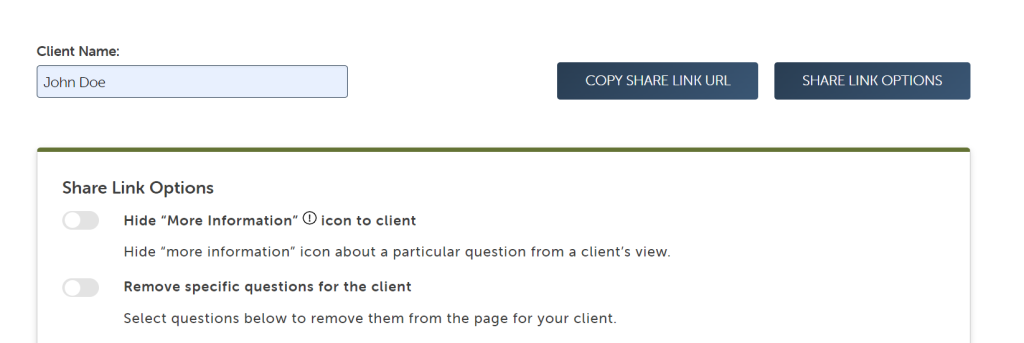
  • Toggle the Share Link Options you want to activate. The change will be universal when you choose to hide the “More Information” icon. Turning on “Remove specific questions for the client” will empower you to hide questions one at a time. 
  • When you’ve made your alterations, and you’re ready to send the interactive checklist to your client, click the “Copy Share Link URL.” From there, you’ll copy and paste it into the email. 

Please take a few minutes and watch the video our support team created for a complete tutorial. 

https://www.fppathfinder.com/wp-content/uploads/2022/02/Share-Link-Options.mp4
 
Who Will Find Share Link Options Valuable?

Ultimately, advisors who connect deeply with their clients will get the most out of the Share Link Options. To go a bit deeper, consider how you’ll use the new functionality if you:

  • Already are a member, and you copy and paste critical questions from the checklist into client emails rather than sending the entire checklist. 
  • Expressed your need for checklist flexibility and are currently an Essentials or Deluxe member.
  • Are considering membership but have been longing for done-for-you interactive checklists that offer some autonomy over the questions you present to your client. 

Premier members will find the Share Link Options are part of their membership. However, Essentials and Deluxe members should visit their account settings page and upgrade there. (Yes! We will prorate your upgraded membership.) 

Not yet a member? We can help you with that! Visit the Become A Member page and join at the Premier level. Additionally, you can join a 30-minute live demonstration to learn more about Share Link Options. Of course, our team is standing by to answer your questions. Send them to support@fpPathfinder.com, and we’ll respond! 
Schedule A Live fpPathfinder Demonstration

Sign Up to Receive Updates

Join our mailing list to be updated as we release new flowcharts and checklists that might be of interest.
  • This field is for validation purposes and should be left unchanged.

Categories

  • Service Guides – Linked
    • Guide Bundles
    • Timely Conversations
    • Age-Related Planning
    • Money In Motion
    • Top 10 Most Popular Resources
    • Client Service Calendar
  • How Advisors Use The Checklists and Flowcharts
    • Best Practices
    • Getting Started
    • Marketing
    • Planning Management
  • Announcements
    • Company Announcements
    • Resource Additions
    • Feature Annoucements
    • Updated Resources
  • In The Press
  • Uncategorized

Become a Member

See how our flowcharts and checklists help you navigate complex financial planning questions.
Become a Member

What Customers Are Saying About Us

Hundreds of other advisors are actively using fpPathfinder. Read what those lovely people have to say about us.
“fpPathfinder has been critical in my execution of financial planning. They provide well thought resources for when clients face specific problems, and I use them over and over again.”
— Roger Whitney, CFP®️, CIMA®️, CPWA®️
“It is very helpful for us when we have a client in and we have an issue at hand. Walking through the checklist helps us big time.”
— William, an advisor In Massachusetts
“I love the flowcharts and have found them very helpful in guiding clients on complicated planning issues. The charts are easy to follow and help navigate through difficult decisions based on clients' unique circumstances.”
— Jason, an advisor in Illinois
“ fpPathfinder is great. It's perfect for supplemental content to enhance our marketing efforts.”
— Ray, an advisor in California
“Checklists don't make the planner smarter or more skilled, but do help to ensure that the planner maximizes the knowledge and skill he/she already has.”
— Michael Kitces, Publisher and Editor-In-Chief at Kitces.com
“I think it’s the bees knees! I think it provides me and my clients the most value of any of the services we use at my firm. Everything is well-designed and the amount of material you guys pack into a page without it being overwhelming is AMAZING!”
— An advisor in Kentucky
“I really love the concept of fpPathfinder because I spend so much time reinventing the wheel when communicating planning concepts to clients. Moreover, the flowchart format can be used time and time again to produce consistent results.”
— Kevin P, an advisor in Illinois
Become a Member
  • Become a Member
  • Member Section
  • Your Membership
  • About Us
  • Contact Us
  • Refund Policy
  • TOS & Privacy Policy
  • Careers: Job Postings

Sign Up For The Newsletter!

Join our mailing list for best practices and ideas for better client conversations.
  • This field is for validation purposes and should be left unchanged.

Have a question, idea, or comment? We want to know! Contact Us

Copyright © 2026 fpPathfinder, All rights reserved.

Streamline A Standout Client Experience With Interactive Checklists

Premier unlocks Interactive Checklists plus CRM integrations with Redtail, Wealthbox, Salesforce Financial Services Cloud, and XLR8.

Learn More

Educate And Impress With Branded Flowcharts, Checklists, And Summary Guides

Deliver white-labled handouts clients won’t want to put down. Upgrade to Deluxe or Premier to white label the guides.

Learn More

Download all your white-labeled guides in one zip file for faster, easier sharing.

Upgrade to Deluxe or Premier for access to this feature.

Learn More

Deliverable Reports: Do More With Less Effort

Upgrade to Deluxe for Single Report Access or Premier Membership for full access. Premier Members can unlock the capability to scale your client communications with the CSV upload option that generates client-specific PDFs. View a Demo here.

Join as a Premier Member

Close
Retry