• Pricing
    • Individual Memberships
    • Group Memberships
  • Webinars
  • Support Hub
    • Full List Of Guides
    • Help & FAQ
    • Partnerships
    • About Us
    • Blog
    • Contact Us
  • Member Section

fpPathfinder

Helping Diligent Advisors Ensure They're On The Right Planning Path

  • Pricing
    • Individual Memberships
    • Group Memberships
  • Webinars
  • Support Hub
    • Full List Of Guides
    • Help & FAQ
    • Partnerships
    • About Us
    • Blog
    • Contact Us
  • Member Section
  • Become a Member
    Log In

Seven Ways to Use fpPathfinder’s Interactive Checklists To Be More Diligent

May 27, 2020
How Advisors Use The Checklists and Flowcharts, Planning Management

As a fpPathfinder member, have you ever wondered, “How do other advisors use fpPathfinder checklists and flowcharts in their firm?”

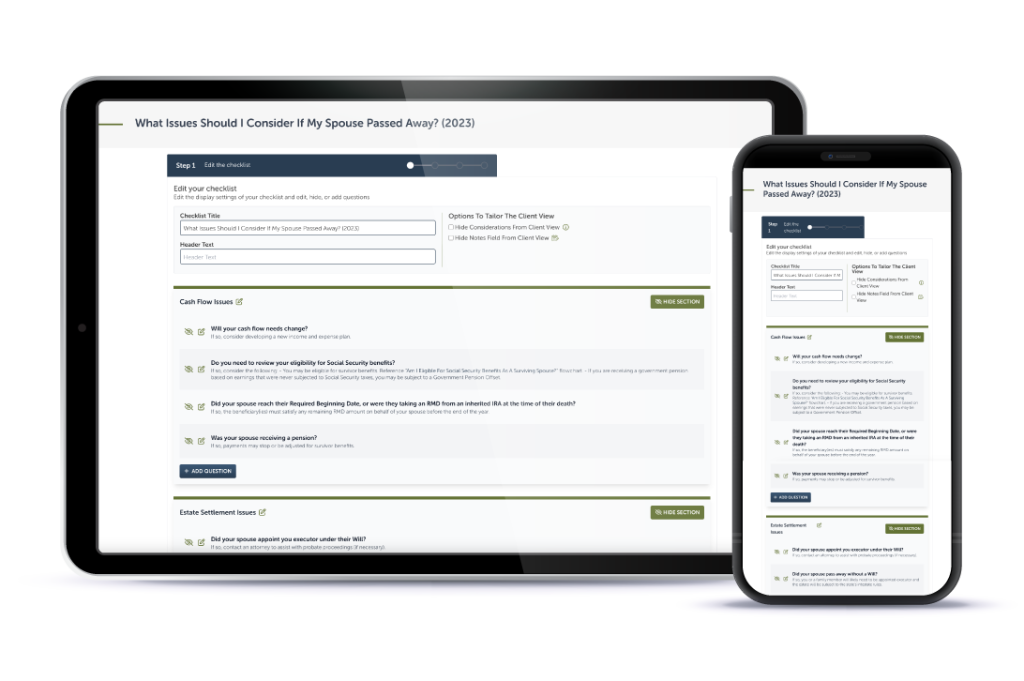
If you’re a new Premier member, there are many ways you can use our interactive checklists and integrate them into your CRM.

At one of the most basic elements, interactive checklists are a note-taking template that make it easier to get information from your client and capture it in writing. For a high level overview, check out this article on using templated notes as a framework to capture more information about your clients.

In some aspects, our interactive checklists serve as conversation scripts. They provide a thoughtful and well organized framework for asking a client questions and prompting you to add notes.

Start small and incorporate one or two of these ideas. Experiment with ways that naturally suit your style. There are many ideas to consider below.

There are several ways to implement interactive checklists in your advisory business:

  • Document key conversations quickly & serve clients better: When a client goes through a life event, document the conversation easily by asking the key questions right away. By having a checklist ready to go, you can quickly provide guidance to the client (instead of having to call the client back after doing research). So when a client calls up saying that their spouse has a terminal illness, you can pull the interactive version of “What Issues Should I Consider If My Spouse Has Been Diagnosed With A Terminal Illness?” to provide diligent, thorough and organized guidance right away.
  • Create a more efficient and detailed “note-taking” process. Adding notes after a meeting to a CRM can be a chore and details are often lacking when referring to notes in the future. Using interactive checklists provides a simple framework to ensure the information is captured clearly and with adequate details. Read this post to learn more.
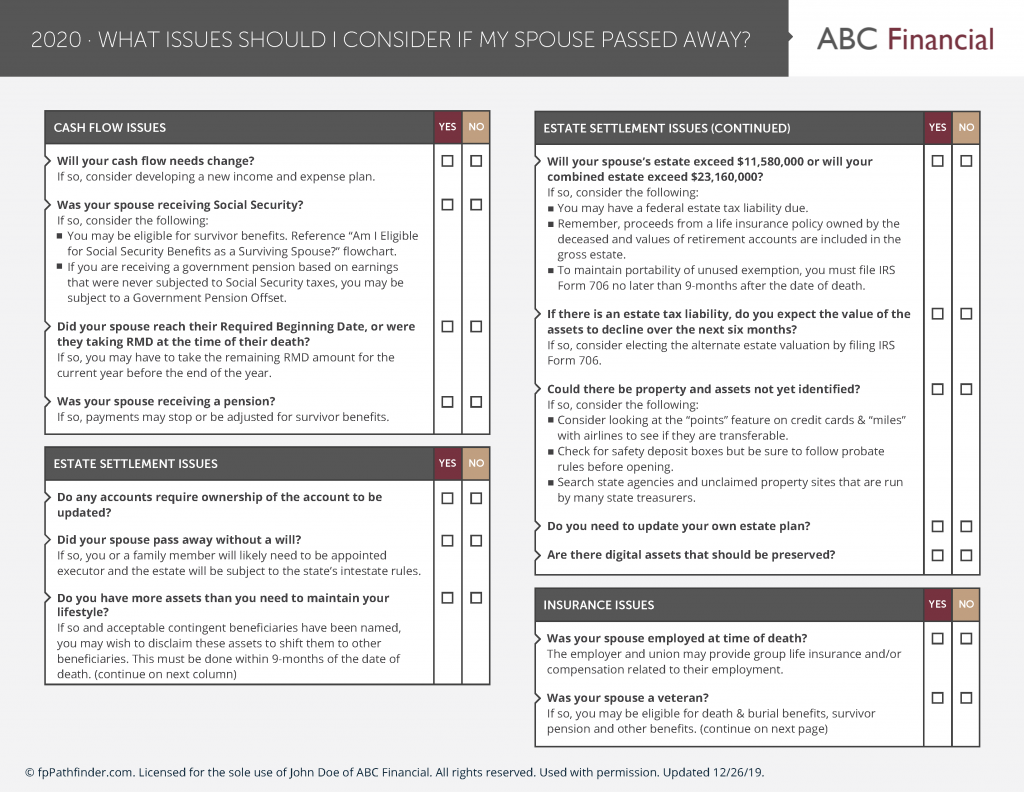
  • Prebuilt agendas and outlines for client meetings. If you’re meeting with the clients (in person or virtually), interactive checklists can provide an agenda and outline for what will be discussed in the meeting. Create a white labeled version of the resource and use our Share A Link feature to send it to the client in advance of the meeting. Some advisors who do not send it to the client to complete before or after a meeting, keep the resources as their “secret sauce” and just ask the questions.
  • Double-check your work and workflows. Instead of completing the checklist with the client present, some advisors review checklists afterward to ensure all the probing questions have been addressed.
  • If you have a service calendar, consider using some of the checklists as elements of the service calendar. Perhaps at the end of the year, you reach out to your clients to discuss end-of-year planning issues and you use the “What Issues Should I Consider Before The End Of The Year?” interactive checklist to help ask the probing question and record the answer. See 12 Creative Ways to Use fpPathfinder To Help Your Marketing to learn more about how you can incorporate checklists and flowcharts into your service calendar.
  • Cross-reference workflows with up to date data. If you use workflows in your CRM, include the URL of each resource addressed in the workflow itself. By adding the URL, you ensure you are always accessing the most up-to-date information.
  • Create a consistent experience across your advisory team. If you are part of a team, encourage all advisors to use these resources when talking with a client. This ensures all advisors on the team provide a consistent and quality level of service, regardless of who they are interacting with on your team.

Need more ideas on how to leverage fpPathfinder checklists and flowcharts? Here are a few more helpful links:
  • Picking The First Checklists And Flowcharts To Incorporate Into Your Business
  • Five Ways Checklists and Flowcharts Will Help You
  • Six (More) Ways Checklists and Flowcharts Will Help You
  • 12 Creative Ways to Use fpPathfinder To Help Your Marketing

Sign Up to Receive Updates

Join our mailing list to be updated as we release new flowcharts and checklists that might be of interest.
  • This field is for validation purposes and should be left unchanged.

Categories

  • Service Guides – Linked
    • Guide Bundles
    • Timely Conversations
    • Age-Related Planning
    • Money In Motion
    • Top 10 Most Popular Resources
    • Client Service Calendar
  • How Advisors Use The Checklists and Flowcharts
    • Best Practices
    • Getting Started
    • Marketing
    • Planning Management
  • Announcements
    • Company Announcements
    • Resource Additions
    • Feature Annoucements
    • Updated Resources
  • In The Press
  • Uncategorized

Become a Member

See how our flowcharts and checklists help you navigate complex financial planning questions.
Become a Member

What Customers Are Saying About Us

Hundreds of other advisors are actively using fpPathfinder. Read what those lovely people have to say about us.
“It’s one of the best software products I have seen. It’s exactly what I have been looking for and trying to build internally. Well done!!!”
— Kate, an advisor in Florida
“I find the flowcharts and checklists helpful for content and for presenting topics to clients. It is a streamlined approach to presenting information and while complex, it also demonstrates the value the advisor brings to the client in helping them navigate these complex situations.”
— An Advisor from California
“We are delighted with the thoroughness of each chart in simplifying the complex questions and helping lead to an answer. These are indeed a helpful asset in our toolbox for work with clients.”
— Victoria L, an advisor in Massachusetts
“I love the new "share a link" feature. This has made it much easier to send flowcharts and checklists to our clients. Thanks for the add!”
— An advisor in Texas
“Thank you for creating a robust, yet very practical, planning tool.”
— Andy, an advisor in Florida
“Thanks for having all of these so conveniently put together. We were working on many of these for years, but often could not find the time to keep them updated. This has been a blessing to our firm. ”
— An advisor in Texas
“I just met with a client who had a question regarding her eligibility for Social Security benefits. We went through the flowcharts answering each question and following the lines. She looked at me and said 'This is great, it was so much easier to use this than trying to go through all the literature that Social Security offers. Thank you so much.'”
— Ben G, an advisor in Wisconsin
Become a Member
  • Become a Member Archived
  • Member Section
  • Your Membership
  • About Us
  • Contact Us
  • Refund Policy
  • TOS & Privacy Policy
  • Careers: Job Postings

Sign Up For The Newsletter!

Join our mailing list for best practices and ideas for better client conversations.
  • This field is for validation purposes and should be left unchanged.

Have a question, idea, or comment? We want to know! Contact Us

Copyright © 2026 fpPathfinder, All rights reserved.

Streamline A Standout Client Experience With Interactive Checklists

Premier unlocks Interactive Checklists plus CRM integrations with Redtail, Wealthbox, Salesforce Financial Services Cloud, and XLR8.

Learn More

Educate And Impress With Branded Flowcharts, Checklists, And Summary Guides

Deliver white-labled handouts clients won’t want to put down. Upgrade to Deluxe or Premier to white label the guides.

Learn More

Download all your white-labeled guides in one zip file for faster, easier sharing.

Upgrade to Deluxe or Premier for access to this feature.

Learn More

Deliverable Reports: Do More With Less Effort

Upgrade to Deluxe for Single Report Access or Premier Membership for full access. Premier Members can unlock the capability to scale your client communications with the CSV upload option that generates client-specific PDFs. View a Demo here.

Join as a Premier Member

Close
Retry